
India's Leading DGFT Consultants
Customs clearance delay due to SIMS 2.0 filing error solution guide for DGFT compliance

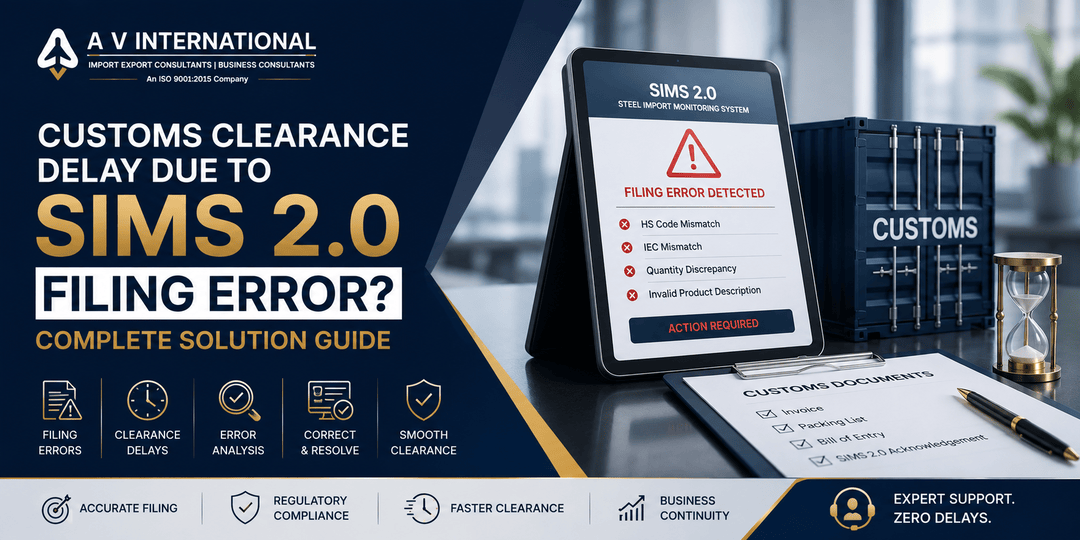
Customs Clearance Delay Due to SIMS 2.0 Filing Error? Complete Solution Guide (2026)

Key Takeaways

  • SIMS 2.0 filing errors can delay customs clearance even after goods arrive at the port.

  • Incorrect HS codes, IEC mismatches, and quantity errors are among the most common causes.

  • Most issues can be resolved by correcting the application and coordinating with DGFT and Customs.

  • Maintaining accurate product documentation significantly reduces approval delays.

  • Professional compliance support helps avoid repeated rejections and detention costs.

Introduction

A shipment arriving on time does not always guarantee quick customs clearance. Many importers in India experience delays because of SIMS 2.0 filing errors, especially for products covered under the Steel Import Monitoring System (SIMS) 2.0 administered by DGFT.

Even a small mismatch in the Importer Exporter Code (IEC), HS code, quantity, or product description can result in shipment holds, additional verification, and higher demurrage charges.

This guide explains the most common SIMS 2.0 filing errors, why customs clearance gets delayed, and the fastest ways to resolve these issues in 2026.

What Is SIMS 2.0?

SIMS 2.0 is the upgraded Steel Import Monitoring System managed by the Directorate General of Foreign Trade (DGFT). It enables importers of specified steel products to file advance import information before customs clearance.

The system helps authorities monitor steel imports while ensuring compliance with DGFT regulations.

Why SIMS 2.0 Errors Delay Customs Clearance

Customs officials verify SIMS 2.0 details against import documents before clearing eligible shipments.

If any information does not match, the shipment may be held for verification until the discrepancy is resolved.

Common consequences include:

  • Cargo examination

  • Document verification

  • Additional clarification requests

  • Port storage charges

  • Demurrage and detention costs

Most Common SIMS 2.0 Filing Errors
1. Incorrect HS Code

Selecting the wrong HS code is one of the most frequent mistakes.

Even minor classification differences can trigger customs verification.

2. IEC Mismatch

The IEC entered during SIMS filing must exactly match the IEC used in customs documents.

3. Product Description Differences

Descriptions should remain consistent across:

  • Commercial Invoice

  • Packing List

  • Bill of Entry

  • SIMS 2.0 application

4. Quantity or Weight Errors

Differences between declared and actual quantities often require additional scrutiny.

5. Manufacturer Details Missing

Incomplete manufacturer information can delay approval.

6. Expired or Invalid SIMS Registration

Using an invalid registration reference may result in clearance issues.

Step-by-Step Solution for SIMS 2.0 Filing Errors
Step 1: Identify the Exact Error

Compare:

  • SIMS application

  • Commercial Invoice

  • Bill of Entry

  • Packing List

  • HS classification

Step 2: Verify Product Classification

Confirm the correct HS code before making corrections.

Step 3: Correct SIMS Details

Update eligible information according to DGFT procedures.

Step 4: Coordinate with Customs

Inform the Customs Appraising Officer about the corrected filing.

Step 5: Keep Supporting Documents Ready

Maintain:

  • Commercial Invoice

  • Packing List

  • Bill of Lading

  • Purchase Order

  • Manufacturer documents

  • Corrected SIMS filing

Documents Required for Resolution

Keep these documents readily available:

  • IEC Certificate

  • Commercial Invoice

  • Packing List

  • Bill of Lading

  • Bill of Entry

  • Purchase Order

  • Manufacturer Certificate

  • SIMS 2.0 acknowledgment

  • Any DGFT communication

Featured Snippet Answer

SIMS 2.0 filing errors can delay customs clearance when details like the HS code, IEC, quantity, or product description do not match import documents. The fastest solution is to identify the mismatch, correct the SIMS filing where permitted, coordinate with Customs, and submit supporting documents for verification.

How Long Does Resolution Usually Take?

The timeline depends on the nature of the discrepancy.

Issue Type

Typical Resolution

Minor document clarification

1–3 working days

HS code verification

2–5 working days

Registration correction

3–7 working days

Complex verification

Longer depending on authorities

Actual timelines vary based on Customs and DGFT processing.

Best Practices to Avoid Future Delays

Before filing SIMS 2.0:

  • Verify HS classification carefully.

  • Match IEC details exactly.

  • Use consistent product descriptions.

  • Double-check quantity and weight.

  • Keep manufacturer details complete.

  • File well before shipment arrival.

  • Maintain digital records of all submissions.

Business Impact of SIMS 2.0 Delays

Delays can lead to:

  • Port storage costs

  • Demurrage charges

  • Production interruptions

  • Delivery delays

  • Increased compliance expenses

Preventive compliance is usually far less expensive than resolving shipment holds.

FAQs

1. What is SIMS 2.0?

SIMS 2.0 is DGFT’s Steel Import Monitoring System for specified steel imports.

2. Can an incorrect HS code delay customs clearance?

Yes. Incorrect classification often triggers verification.

3. Can SIMS details be corrected?

Certain issues can be corrected depending on DGFT procedures and the stage of processing.

4. Which documents should match SIMS data?

Commercial Invoice, Packing List, Bill of Entry, and product details should remain consistent.

5. Does every steel import require SIMS 2.0?

Only products covered under applicable DGFT notifications require SIMS filing.

6. How can businesses reduce SIMS-related delays?

By verifying documentation, filing accurately, and maintaining complete compliance records before shipment arrival.

Conclusion

SIMS 2.0 filing errors can create avoidable customs clearance delays that increase costs and disrupt business operations. Most problems arise from mismatched HS codes, IEC details, product descriptions, or quantity declarations.

A systematic document review and timely coordination with DGFT and Customs can help businesses resolve issues faster and reduce future compliance risks.

Need Help with SIMS 2.0 Compliance?

A V International has over 35 years of experience helping importers and exporters manage DGFT compliance, SIMS registrations, customs documentation, and regulatory approvals.

Whether you’re facing a shipment delay or need assistance with accurate SIMS 2.0 filing, our compliance experts can help streamline the process and reduce unnecessary delays.

Written By

Akash Bhangare

Having more than 10 years of experience in EPR Compliance, Legal Metrology, DGFT Regulations, and Import Export Consulting Services in India.

Associated with A V International, a company with over 35 years of expertise in Environmental Compliance, EPR Registrations, Licensing, and Regulatory Approvals.

FeATURED ARTICLES